
Airsound Spatial offers flexible placement of speakers, but it can be challenging to set the relative volume of these correctly by ear, and fine tuning requires some trial and error. This information is intended to help give your system a good starting configuration from which you can fine tune as you like.
1. Speaker Placement

Shown above are 2 options for speaker placement. Both are fine and may be chosen to suit a room and listener preference. However, it’s important that their locations are dialed in to ASAP accordingly. The speaker angle is found on the ‘Main Settings’ page:
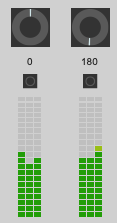
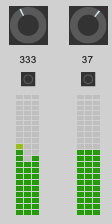
2. Speaker Volume
The next thing to consider is the relative volume of the speakers. This can be harder than normal stereo to set up by ear because different spatial audio material sounds very different. However, it is possible to perform a quick calculation here to help you get some good starting speaker volume levels…

In the above diagram, make a note of the distance to the near speaker and the far speaker, and put them in to the calculator below…
Enter this value in the ASAP control panel:
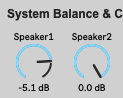
e.g. This represents the front speaker (1) being about 1m from the listener, and speaker 2 being wall mounted a little over 2m behind the listener.
Final Thoughts
This guide provides a starting point, and should not be considered the perfect setting. Acoustic conditions of a room will affect the outcome. More reflective and lively rooms may need smaller gain differences. More sound treated rooms that are larger may need more extreme adjustments.
For precise adjustment, you can use the 'noise object' or 'channel testing / tone' sections to generate test signals in combination with a sound level meter to acoustically measure and correct the speaker gain settings.